The segmentation was designed well. Nobody checked whether it stayed that way.
Nine network segmentation best practices in the order you would implement them, with a zone diagram, worked examples, and the one most networks skip.
Most lists of network segmentation best practices stop at the design: zones, a default deny, a tidy diagram. The design is rarely what fails. In the seven documented breaches we keep on this site, every organization had firewalls, VLANs and a diagram. What failed was a path that opened later, through an ordinary change, with nobody trying it.
So this list has nine practices, in the order you would implement them, and the last one is the one that keeps the other eight true.
A printer at Kessler Freight
Kessler Freight replaced its firewall last year. The old one had four hundred rules written against single addresses, and the migration tidied them into object groups. It was good work, and the rule base came out a third of the size.
One group was called SRV-INTERNAL. During the cutover, the multifunction printers could no longer save documents to shared folders, because the printers needed SMB to the file server and their VLAN was in no group at all. The quickest fix was to add the printer VLAN to SRV-INTERNAL. The printers worked again, and the ticket was closed that afternoon.
SRV-INTERNAL was also the source of the rule that lets servers reach the backup console on 443. Nobody had that rule in mind when the printers went into the group. From that afternoon, a printer in reception with a default admin password could open the console that deletes every restore point.
The rule to the backup console never changed. The group it pointed at did. The Australian Signals Directorate describes this in its segmentation anti-patterns publication: "the rule has not changed, but its effective subject has". Kessler Freight is invented. The mechanism is not.
The nine practices, in the order you would implement them
- List what must be protected before you draw anything. Backups, hypervisors, domain controllers, databases, payment systems, the plant network. Segmentation is a set of answers to "what must not reach this", and the list is the question.
- Draw zones by trust and criticality. A zone is a group of systems that carry the same risk and need the same access. Floors and departments make poor zones. A staff laptop and a guest's phone share a building and nothing else.
- Deny by default between zones, and name every approved path. An approved path is a source, a destination and a port: Office PCs to FS01 on 445. "Office to servers, any" is a zone boundary that exists only on the diagram.
- Put management interfaces on their own network. Hypervisor consoles, out-of-band controllers, and switch and firewall management are reached from a jump host or an admin workstation. No desk gets a direct path to them.
- Isolate the backups. The backup system reaches out to the servers it protects. Nothing reaches in except the admin path. Attackers look for the backups before they encrypt anything else.
- Keep guest and unmanaged devices apart. Guest Wi-Fi gets the internet and nothing else. Printers, cameras, building controllers and anything a contractor installed get their own zone, because nobody on your team can patch them.
- Write down each approved path with its owner and its reason. A rule with a named owner and a ticket can be reviewed. A rule with neither stays forever, because nobody knows what removing it would break.
- Review on a cycle, and after every change. Give temporary rules an end date on the day they are added. Check what each object group contains, since a group can grow without any rule changing.
- Test that the boundaries hold. Try the connections that must be blocked, from inside the zone they start in, and keep the result. This is the practice that tells you when one of the other eight has stopped being followed.
A network segmentation diagram for a small office
Six zones cover most networks with one site and a server room. Larger networks repeat the pattern per site.
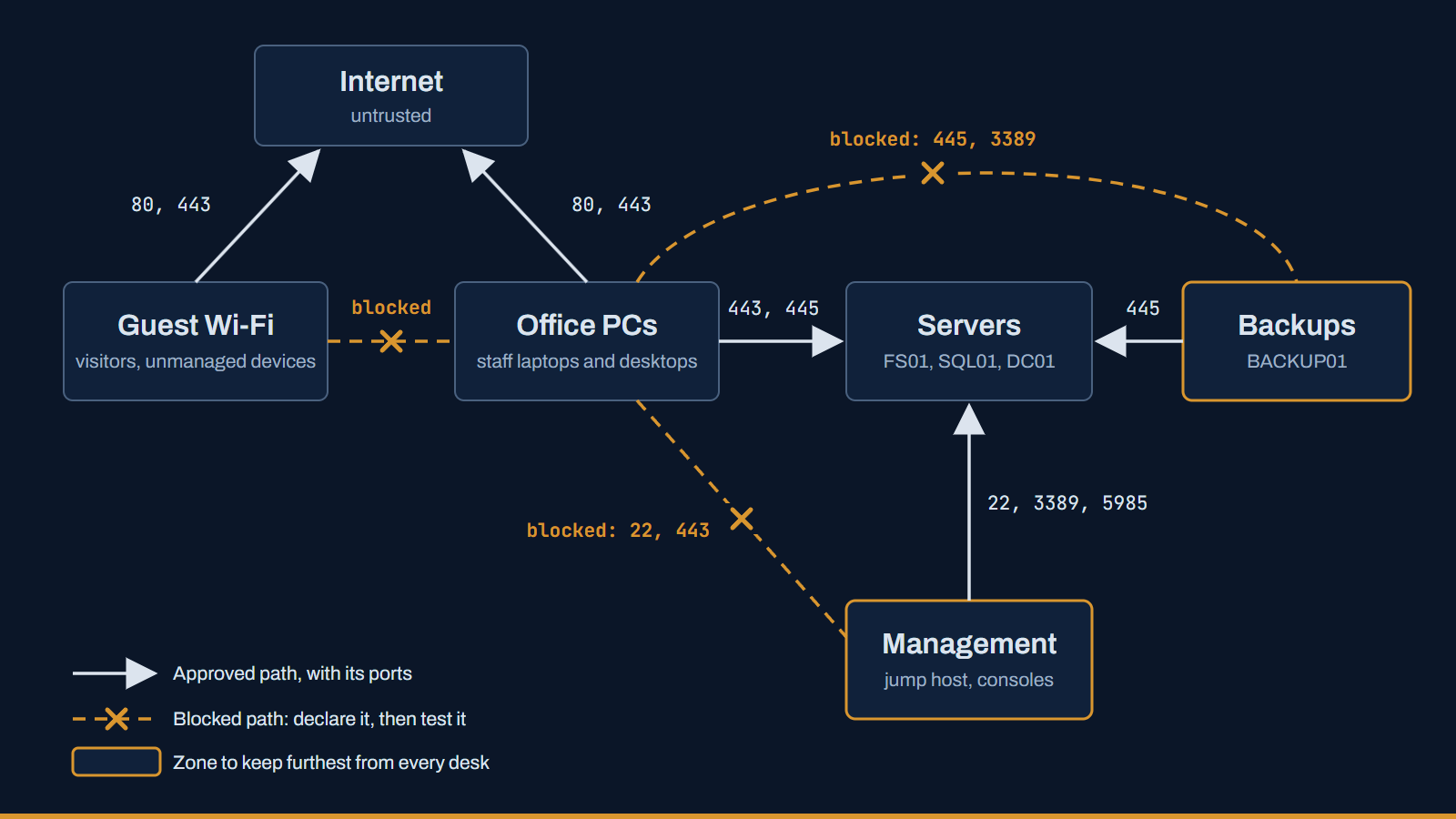
Two things about the diagram matter more than its layout. Every arrow has ports on it, so each approved path can be checked against a rule. And the blocked paths are drawn, not left as empty space. A path that is absent from the diagram is one nobody has decided about.
Network segmentation examples, written as paths
A design becomes testable when each boundary is written as a path with a source zone, targets, ports and an expected result. These three come from the diagram, in the form we use for starter policies.
The ransomware path. Office PCs must not reach BACKUP01 on 445 (SMB), 3389 (RDP).
DENY Office PCs -> BACKUP01 TCP/445,3389
The management shortcut. Office PCs must not reach the hypervisor hosts on 22 (SSH), 443 (HTTPS). Whoever reaches the hypervisor owns every virtual machine on it.
DENY Office PCs -> ESX01 +2 targets TCP/22,443
The path that must stay open. Backup server must reach FS01 on 445 (SMB). A blocked path and a powered-off server look the same from the outside, so one Allow confirms the target is listening. It also catches the clean-up that removes a rule something still depended on.
ALLOW Backup server -> FS01 TCP/445
At Kessler Freight, the path that mattered was a fourth one: Printers must not reach BACKUP-CONSOLE on 443 (HTTPS). Nobody would have thought to write it before the migration, which is the argument for writing a Deny for every zone that has no business with the backups, not only the obvious one.
What the documented failures have in common
Three of the incidents on our list map onto single practices above.
- Practice 8, review after every change. At SingHealth, a permitted path from hospital Citrix servers into the national patient database was opened for a 2017 migration and was still there a year later. The full account has the inquiry's findings.
- Practice 2, zones by trust. The independent review of the attack on Ireland's health service used the word "flat" for the national network. Ransomware crossed many connected organizations. The full account has the review's findings.
- Practice 3, deny by default. The British Library's own review says its historically complex network topology let the attackers reach more than a modern design would have allowed. The full account links to it.
In each case segmentation was one factor among several. None of these organizations decided to be flat. The network drifted there through legitimate changes, and the frameworks have noticed. PCI DSS, ISO 27001, the NIST publications and the rest each ask for segmentation under a different number, and our control map lists where and what each one expects as proof.
How to implement network segmentation without stopping the business
Practices 1 to 3 are a project. On a network that is flat today, do them one boundary at a time, starting with the backups, because that boundary has the fewest legitimate paths across it.
For each boundary, write the Deny paths first and try them. They will connect, because nothing is enforced yet. Add the firewall rule, try them again, and keep both results. You now have a dated record that the boundary went in and that it worked on the day.
Then write the Allow paths for what must keep working, and try those too. A segmentation project that breaks the backup job on its first night loses its sponsor by the second morning.
How to test network segmentation covers the method by hand: the test matrix, the commands, and how to record a result. If you are reviewing an existing rule base first, the firewall audit checklist covers practices 7 and 8.
The practice that goes missing
Practices 1 to 8 are things you do. Practice 9 is the only one that tells you whether they are still done.
A design review confirms the zones were drawn well. A rule review confirms the rules read correctly on the day of the review. Neither would have caught the printer at Kessler Freight, because every rule read correctly and the diagram was accurate. The only thing that catches it is a machine on the printer VLAN trying the backup console and getting through.
A test run by hand describes one day. The migration, the 2 a.m. rule and the temporary VLAN all happen on the other days, and after following every practice on this page you still have no way to tell when one of them stops being followed.
That is the part Segproof does. You declare the paths, an agent in each source zone attempts only the connections you declared, as often as every 5 minutes on the paid plan and once a day on Free, and every result is kept. When a blocked path opens, the alert names the agent, the address, the port and the minute it changed.